


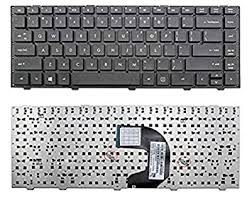
HP Probook 4440S Laptop Keyboard – Reliable, Durable, and Perfectly Compatible
If you’re experiencing unresponsive keys, stuck buttons, or general wear and tear on your HP Probook 4440S, it may be time to replace the keyboard. The HP Probook 4440S Laptop Keyboard is a high-quality replacement designed specifically to fit and function seamlessly with your HP Probook 4440S model.
This replacement keyboard is engineered for perfect compatibility, offering the same layout, feel, and durability as your original keyboard. Whether you are a student, a professional, or a casual user, this keyboard ensures smooth typing performance for all your computing needs.
Why Choose the HP Probook 4440S Laptop Keyboard?
Replacing a damaged or worn-out keyboard can greatly enhance your productivity and typing experience. Here are several reasons why the HP Probook 4440S Laptop Keyboard is the ideal choice:
1. Perfect Fit for HP Probook 4440S
This keyboard is specifically designed for the HP Probook 4440S laptop model. It matches the original dimensions, screw positions, and keyboard ribbon connector layout to guarantee a secure and accurate fit.
2. Easy Installation
You don’t need to be a technician to install the HP Probook 4440S Laptop Keyboard. With just a few tools, you can replace your old keyboard in under 20 minutes. The plug-and-play ribbon connector makes installation simple and hassle-free.
3. High-Quality Build
Built with high-quality ABS plastic and responsive key mechanisms, this keyboard offers long-lasting durability. The keys provide a comfortable typing experience, maintaining quiet and precise feedback for efficient typing.
4. Enhanced Typing Experience
Each keystroke on the HP Probook 4440S Laptop Keyboard is smooth and responsive. Whether you are writing documents, replying to emails, or coding, this keyboard delivers consistent performance with every press.
Product Features of HP Probook 4440S Laptop Keyboard
- Compatibility: Exclusively designed for HP Probook 4440S series laptops.
- Layout: Full QWERTY English layout with all standard keys and function shortcuts.
- Build Material: Durable ABS plastic with a strong internal frame for long-term use.
- Connectivity: Standard ribbon cable connection – no drivers or software needed.
- Color: Matte black with clear white letter printing.
- Warranty: Comes with a standard warranty for manufacturing defects.
Technical Specifications
| Feature | Description |
|---|---|
| Model Compatibility | HP Probook 4440S Series |
| Layout | QWERTY – US English |
| Color | Black |
| Backlit Support | No |
| Material | ABS Plastic |
| Installation Type | Internal, requires unscrewing laptop panel |
| Connection | Ribbon Cable Connector |
Applications and Use Cases
The HP Probook 4440S Laptop Keyboard is ideal for:
- Students needing a reliable keyboard for research and assignments.
- Office users working on reports, emails, or spreadsheets.
- Freelancers or digital professionals looking for affordable hardware upgrades.
- Repair shops or IT departments looking for compatible replacements for damaged keyboards.
Affordable and Trusted Replacement
Unlike generic or universal keyboards, the HP Probook 4440S Laptop Keyboard guarantees full compatibility without the risk of mismatch. It eliminates issues such as misaligned keys, poor connectivity, or incorrect key mapping.
This keyboard is priced competitively to offer great value for money. You don’t have to spend a fortune on a full laptop repair – replacing just the keyboard is an affordable way to restore your laptop’s usability and extend its lifespan.
Installation Tips for the HP Probook 4440S Laptop Keyboard
Before installing the new keyboard:
- Shut down your laptop and disconnect the power supply.
- Remove the battery and unscrew the back panel carefully.
- Detach the old keyboard by loosening its clips and disconnecting the ribbon cable.
- Attach the new HP Probook 4440S Laptop Keyboard by connecting the ribbon cable and securing the keyboard into place.
- Reassemble your laptop and power it on.
If unsure, you may contact a technician for professional installation.
Order the HP Probook 4440S Laptop Keyboard Today
Don’t let a faulty keyboard slow you down. Upgrade your typing experience with a brand-new HP Probook 4440S Laptop Keyboard. It’s the perfect solution for restoring your laptop’s functionality with minimal effort and cost.
Enjoy fast delivery, competitive pricing, and trusted customer service when you order from us. Your satisfaction is our priority.
Model Number: Hp Probook 4440s
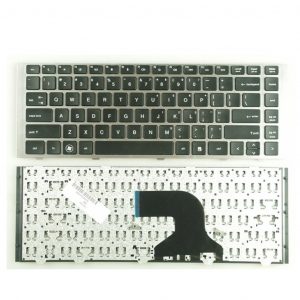
hp-probook-4440s-laptop-keyboard
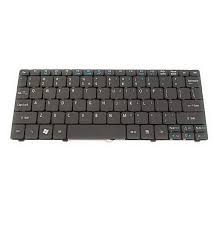
HP Probook 4440S Laptop Keyboard
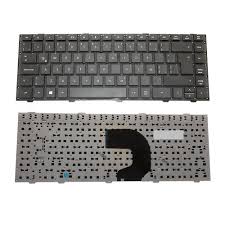
HP Probook 4440S Laptop Keyboard
Type: Laptop Keyboard
Designed For: HP Probook 4440s 4441S 4445s 4446s
HP Probook 4440S Laptop Keyboard Compatible Model:
|
|

Reviews
Clear filtersThere are no reviews yet.